Monday, March 16, 2009
How to Fix Boxee Black Screen Error on Apple TV
 Is your Apple TV freezing when you launch Boxee? Do you see a quick flash of the Apple logo and then just a blank "black screen"?
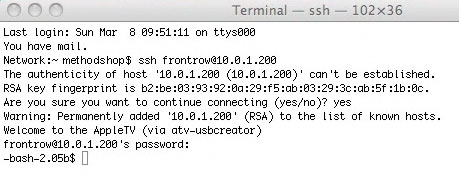
You aren't alone. If you were one of the early Boxee beta/alpha testers, you might have some files leftover from an old install. Don't even bother reinstalling Boxee or trying a factory restore on your Apple TV. These won't solve your Boxee problems. You need to remove the old user data files using a SSH client.
In this tutorial, we will walk you through the steps to remove these old files and return your Boxee software to normal functionality on your Apple TV.
methodshop
Labels: apple tv, gadgets, tutorial, video


Tuesday, March 10, 2009
Hulu Blocks Boxee... Again
The streaming video site Hulu and the streaming-video-on-your-TV service Boxee spent all of last weekend fighting. Again. In late February, Hulu asked Boxee to remove the special Hulu browser from the Boxee software. Boxee complied with Hulu's request, but Boxee users were very upset.Then last weekend, Boxee figured out a way around the Hulu issue. Boxee was able to reintegrate Hulu videos back into Boxee's software by creating a video RSS reader. Basically Boxee was just browsing Hulu's public RSS feeds which any web browser or RSS reader can do. This solution wasn't as flashy as the special Hulu application that Boxee had made, but it was a good work around until a formal deal could be worked out with Hulu.
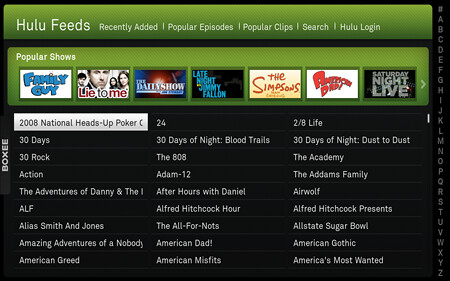
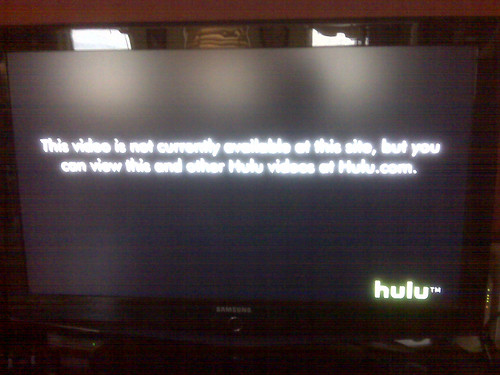
Over the weekend, news quickly spread on Twitter that Boxee had reintegrated Hulu back into the Boxee software. Boxee users rejoiced but their celebration was short lived. Even though Boxee was only importing Hulu's public video RSS feeds, Hulu promptly blocked the Boxee RSS browser and displayed the following message: "This video is not currently available at this site, but you can view this and other Hulu videos at Hulu.com."
In response, Boxee released a statement on the company's blog:
"To our users: if you choose to use Boxee as your media browser to view legal and publicly available content on the Internet, we will do everything we can to ensure that you can access it, no matter what the source... while some of the best things in life are free, sometimes you have to work hard to get them."
Why is Hulu is putting so much effort into blocking Boxee? The only difference between Boxee and your web browser is that Boxee's browser is on your TV screen, rather than your computer screen.
However, there is a silver lining to this story for Boxee users. The new video RSS reader functionality that Boxee developed to reintegrate Hulu can be used to access other public RSS feeds. The next version of Boxee will most likely include the new RSS reader and a feature called "App Box" that will help simplify the addition of new in-house and third party applications.
Boxee hopes to have a new release ready before their New York City Boxee meetup on March 24.
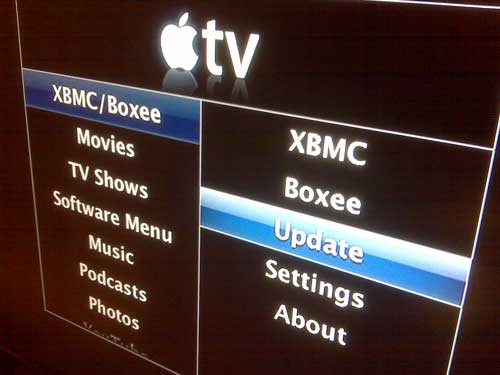
Not sure what all this Boxee talk is all about? Boxee is a free open source cross-platform media center and entertainment hub that can play movies, TV shows, music and photos, as well as streaming content from websites like
Tutorial: How to Install Boxee on Your Apple TV
All you need to install Boxee on your Apple TV is a USB stick. If you own an Apple TV, then you need Boxee. Install Boxee and set your Apple TV free.
methodshop
Labels: apple tv, gadgets, tech news, tutorial, video
Friday, February 27, 2009
Apple TV 2.3.1 Update Breaks @Boxee
 This week Apple released a very minor firmware update for the Apple TV. The 2.3.1 update only adds a "Network Test" option to help users troubleshoot Internet connections. That's it. Seriously, it's hardly worth the trouble. But the update does do something we weren't expecting... it disables and deletes the Boxee software.
Boxee is a free open source cross-platform media center application that enables your Apple TV to play streaming content from websites like
So if you've already hacked your Apple TV and installed the Boxee software, you should probably skip this 2.3.1 update and wait for a new version of the Apple TV firmware that actually adds some new features.
Unfortunately this has been a rough few weeks for Boxee. First they had to remove the ability to watch Hulu videos from their software because Hulu's content partners were complaining. And now Apple is releasing minor software updates that disable Boxee.
If you love Boxee, then you'll want to disable automatic Apple TV updates. Here's how:
- After you've hacked your Apple TV and installed Boxee, select "Settings" from the Launcher menu (Launcher > Settings).
- You should now see a screen with two options that say "Use Universal Mode" and "ATV OS Update enabled." Set "ATV OS Update Enabled" to "No."
- That's it. For now on, minor Apple TV firmware updates will no longer ruin your Boxee fun.
Tutorial: How to Install Boxee on Your Apple TV
All you need to hack your Apple TV so it can use Boxee is a USB stick. If you own an Apple TV, then you need Boxee. Install Boxee and set your Apple TV free.
methodshop
Labels: apple, apple tv, tech news, tutorial
Thursday, February 05, 2009
Troubleshooting an Apple TV
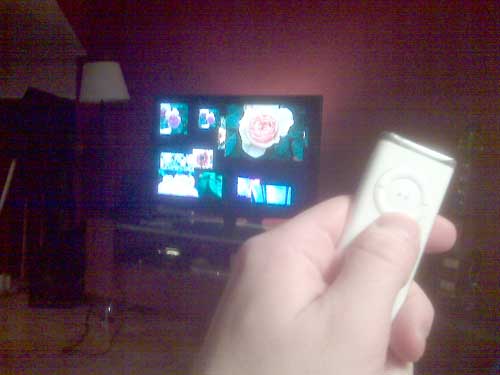
Is your Apple TV frozen or unresponsive? Is the battery in your Apple Remote control dead? Is the hard drive completely fried? This tutorial will walk you through a variety of common problems and help you figure out what's wrong with your Apple TV.
methodshop
Labels: apple tv, gadgets, tutorial
Thursday, February 21, 2008
Apple TV 2.0
 The newly revamped, reduced-in-price Apple TV
 Standard def movies rent for $3.99 for new releases and $2.99 for library titles. HD movies (1280 x 720) cost $4.99/$3.99.
The user interface allows you to browse through thumbnail images of available titles from most of the major studios and start watching them within seconds (provided you enjoy a broadband connection exceeding 6 MB/second.)
If you already own an Apple TV, the unit will upgrade itself automatically to the new software.

You can read our review of the Apple TV here.
methodshop
Tuesday, February 05, 2008
Apple TV Update Delayed

Last week Apple announced they needed another couple of weeks to finish updating the Apple TV software that will finally allow users to rent movies directly from the TV rather than having to download on the computer and sync or stream the video to the Apple TV device.
This anticipated software upgrade will be available as a free software download to existing Apple TV users sometime in February. By the end of February, Apple’s iTunes online music store should have more than 1,000 movie titles available including more than 100 high-definition titles. The DVD-quality movies will be available to rent for $2.99 for older titles and $3.99 for newer titles while high-definition costs a buck more.
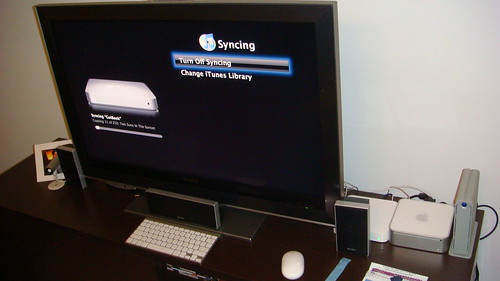
Also last week, Apple announced the MacBook Air has started shipping. Hopefully Apple packages the MacBook Air in something a little more sturdy than the envelopes featured in the ads!
Here's a video of the old Apple TV software:
via: Gizmos for Geeks.
Labels: apple, apple tv, itunes, video
Tuesday, January 15, 2008
Macworld: Apple TV - Take 2
Steve Jobs announced an update to the Apple TV at Macworld San Francisco this week as well as iTunes Movie Rentals, which were already rumored to be part of his Macworld keynote speech.
Jobs admitted that Apple's online video plan had been a disappointment and that users didn't take to watching online video the way Apple had expected. When Jobs first announced the Apple TV last January, Apple's initial video plan was too complicated for many people. Getting a movie or TV show onto your Apple TV required customers to buy the video from the iTunes Store, download it to their computer, then sync/stream the file using an Apple TV.
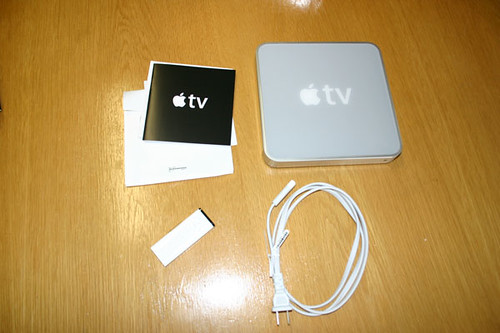
Although Apple has already sold 7 million movies, Jobs said: "That’s more than everyone else put together, but it did not meet our expectations."
Apple plans on overhauling their strategy by making 2 major changes:
Jobs thinks that viewers would prefer to rent movies, not buy them. As a result, the new Apple TV software will allow users to rent first run films from every major movie studio including Fox, WB, Paramount, Universal and Sony in HD. Jobs called it "A better way to provide movies to our customers." Blockbuster and Netflix can't be happy right now.
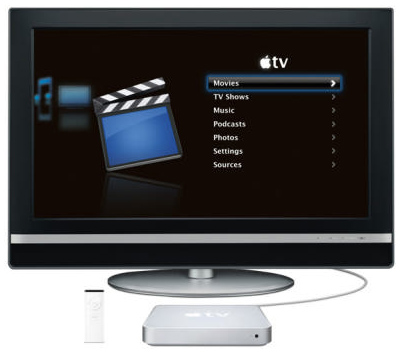
1000 films ready for rental will be available on iTunes starting in February. Going forward, movies will be available to rent 30 days after they are released on DVD. Broadband users won't have to wait for these giant movie files to download. Moments after you rent the film using your Apple TV, it will be watchable immediately via streaming. How much are movie rentals? $2.99 to rent older titles, $3.99 for new releases. Add one more $1 to those prices if you want to rent the movie in HD.
Thomas Lesinski, president of Paramount Pictures Digital Entertainment, joined Jobs on stage at Macworld and called the rental service a "defining moment" for the distribution of digital video content. "This is really going to take things to the next level," he said.
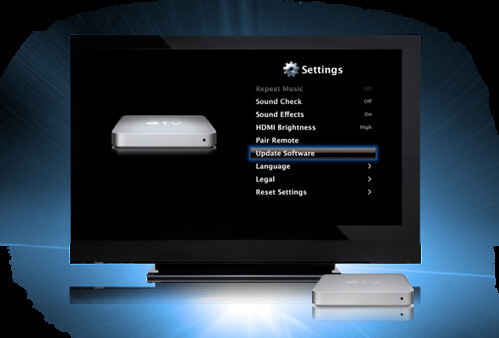
The new Apple TV software features will be included in a free Apple TV update scheduled to be released in February. You can update your Apple TV by selecting "Update Software" from the Settings menu.
methodshop
Jobs admitted that Apple's online video plan had been a disappointment and that users didn't take to watching online video the way Apple had expected. When Jobs first announced the Apple TV last January, Apple's initial video plan was too complicated for many people. Getting a movie or TV show onto your Apple TV required customers to buy the video from the iTunes Store, download it to their computer, then sync/stream the file using an Apple TV.
Although Apple has already sold 7 million movies, Jobs said: "That’s more than everyone else put together, but it did not meet our expectations."
Apple plans on overhauling their strategy by making 2 major changes:
- Adding a new online movie rental service
- Updating the Apple TV's software so that viewers can stream movies direct from the internet sans (that's Middle English for without) computer.
Jobs thinks that viewers would prefer to rent movies, not buy them. As a result, the new Apple TV software will allow users to rent first run films from every major movie studio including Fox, WB, Paramount, Universal and Sony in HD. Jobs called it "A better way to provide movies to our customers." Blockbuster and Netflix can't be happy right now.
1000 films ready for rental will be available on iTunes starting in February. Going forward, movies will be available to rent 30 days after they are released on DVD. Broadband users won't have to wait for these giant movie files to download. Moments after you rent the film using your Apple TV, it will be watchable immediately via streaming. How much are movie rentals? $2.99 to rent older titles, $3.99 for new releases. Add one more $1 to those prices if you want to rent the movie in HD.
Thomas Lesinski, president of Paramount Pictures Digital Entertainment, joined Jobs on stage at Macworld and called the rental service a "defining moment" for the distribution of digital video content. "This is really going to take things to the next level," he said.
The new Apple TV software features will be included in a free Apple TV update scheduled to be released in February. You can update your Apple TV by selecting "Update Software" from the Settings menu.
methodshop
Labels: apple tv, itunes, macworld
Monday, November 19, 2007
Hacking YouTube Videos
 UPDATE: YouTube has reworked their site again in response to this article. They absolutely hate us. If you get an error when trying to download a YouTube video, please try some of the plug-ins and scripts listed in step #3.
YouTube.com is a great resource. Not many sites allows users to freely upload, view, and share video clips like YouTube does. YouTube even lets users easily post videos on their blogs and personal web sites. But because anyone can upload a video clip on YouTube, copyright violations are rampant.
In an effort to prevent the widespread distribution of illegal copied video files, YouTube encodes its video files in the Adobe Flash format, which prevents viewers from downloading files and making digital copies.
Here's a step-by-step tutorial on how to rip video files off YouTube.com and convert them for Apple TV, iPod Video, iTunes and iPhone. This trick will work on Mac or PC using Firefox or Internet Explorer.
BeSocial: digg story | methodshop
Labels: apple tv, iphone, ipod, itunes, tutorial
Wednesday, June 20, 2007
YouTube Live Today on Apple TV
 Good news for Apple TV and the iPhone. Starting today, Apple TV owners can start watching YouTube content on their TV sets. YouTube content will also be available to the iPhone when it officially launches on June 29th.
Apple TV users can download a free update via the built-in software update option to enable a new YouTube content menu. An option to "check for updates" is listed under the Apple TV settings screen.
iPhone users will be able to enjoy YouTube's originally-created content on their iPhones when they begin shipping on June 29. A YouTube player application on the iPhone will wirelessly stream YouTube's videos to the iPhone over Wi-Fi or EDGE networks and play it on iPhone's 3.5 inch display.

Both AppleTV and the iPhone will play YouTube content that has been reencoded into Apple's h.264 video format. 10,000 of YouTube's videos have been converted so far with the remainder expected by the fall. An Apple press release claims that h.264 was chosen "to achieve higher video quality and longer battery life on mobile devices."
Reports coming out of WWDC 2007 say that one of Apple's justifications of avoiding Flash video playback on the iPhone is improved battery life. The iPhone contains dedicated hardware capable of playing h.264 content, while Flash content would require more intensive use of the iPhone's CPU, resulting in higher battery drain.
You can read a review of the Apple TV here.
BeSocial: macrumors | digg story | methodshop
Labels: apple tv
Thursday, May 31, 2007
YouTube Coming to Apple TV
 Wish you could watch YouTube videos on your Apple TV? Sometime in June, all Internet connected Apple TV boxes will accept a free software patch that will enable wireless streaming of YouTube videos. YouTube is making thousands of clips available each week until thier full catalog is accessible later this fall.
You'll be able browse the YouTube content on your Apple TV in a variety of ways including: featured, top viewed, recently viewed, history, and even by search. I'm dreading the search option. If you haven't used the Apple TV yet, there's a USB port in the back of the device, but you currently can't use a keyboard for some reason. Entering text on the Apple TV is the equivalent of typing in your initials for the high score screen in an arcade game. Very painful without a keyboard.
 So how chewy will these compressed YouTube videos look on your HD TV? I've already ripped a bunch of music videos off YopuTube, converted them to MPEG-4 videos and saved them in iTunes. Honestly, the Flash encoded YouTube videos look like crap on a HD TV. YouTube doesn't even look good when stretched out to its default 480 x 360, let alone 640 x 480 or HD. But YouTube does have thousands of clips and can provide endless hours of entertainment. Fuzzy, but fun.
Apple also announced a new Apple TV model with a 160 GB hard drive for $400. You'll still be able to buy the old 40 GB version for $300, but personally, I think $100 for 4x the storage is a great deal.
You can read more about the Apple TV here: Apple TV Review
BeSocial: digg story | methodshop
Labels: apple tv
YouTube Coming to Apple TV
Wish you could watch YouTube videos on your Apple TV? Sometime in June, all Internet connected Apple TV boxes will accept a free software patch that will enable wireless streaming of YouTube videos. YouTube is making thousands of clips available each week until thier full catalog is accessible later this fall.You'll be able browse the YouTube content on your Apple TV in a variety of ways including: featured, top viewed, recently viewed, history, and even by search. I'm dreading the search option. If you haven't used the Apple TV yet, there's a USB port in the back of the device, but you currently can't use a keyboard for some reason. Entering text on the Apple TV is the equivalent of typing in your initials for the high score screen in an arcade game. Very painful without a keyboard.
So how chewy will these compressed YouTube videos look on your HD TV? I've already ripped a bunch of music videos off YouTube, converted them to MPEG-4 videos and saved them in iTunes. Honestly, the Flash encoded YouTube videos look like crap on a HD TV. YouTube doesn't even look good when stretched out to its default 480 x 360, let alone 640 x 480 or HD. But YouTube does have thousands of clips and can provide endless hours of entertainment. Fuzzy, but fun.Apple also announced a new Apple TV model with a 160 GB hard drive for $400. You'll still be able to buy the old 40 GB version for $300, but personally, I think $100 for 4x the storage is a great deal.
You can read more about the Apple TV here: Apple TV Review
BeSocial: digg story | methodshop
Labels: apple tv
Thursday, April 19, 2007
Apple Asks Video Podcasters to Increase Quality
Last week Apple sent out an email (screenshot courtesy of TechCrunch.com) to video podcasters asking them to increase the quality of their productions and start formatting their videos for the big screen. Since the launch of the Apple TV (full review here) in March, Apple TVs have been selling like hotcakes and video podcast subscription numbers have skyrocketed.
 Apple TV owners, who don't necessarily want to spend lots of money in the iTunes Store, are gobbling up video podcasts like never before. Even though there currently isn't any HD quality videos for sale in the iTunes Store, the Apple TV is capable of HD video playback. So several popular video podcasters, including The Washington Post, TWIT (MacBreak), Revision3 (Diggnation) and Vintage Tooncast, have decided to fill the void of HD content by distributing their podcasts in HD or hi res quality.
Why hasn't everyone started distributing their video podcasts in HD? Money. Not only does producing an HD podcasts require extra hard drive space (roughly 4 times more), special cameras and editing software, but just hosting these giant video files on the Internet can be enough to bankrupt your entire production. For example, the iPod Video version of MacBreak episode 63 is 21 MBs. The HD version is 93 MBs. To help alleviate increased HD production costs, many podcasters have reached out to HD television manufacturers like Samsung and Panasonic to get them to sponsor their new HD podcasts.
For video podcasters who are still producing content at 320x240 but want to do something to increase quality, there is an intermediary step before going HD. Podcasters can start by migrating their productions to 640x480, or even 640x360 (letterbox). This way their video files will still be compatible with portable media players like the Zune and iPod, but will also work on the Apple TV. If the material is carefully encoded, it will look as good or better than typical TV.
Apple listed the following tips and recommendations in their email to all video podcasters:
BeSocial: digg it | linkcritics | methodshop
Apple TV owners, who don't necessarily want to spend lots of money in the iTunes Store, are gobbling up video podcasts like never before. Even though there currently isn't any HD quality videos for sale in the iTunes Store, the Apple TV is capable of HD video playback. So several popular video podcasters, including The Washington Post, TWIT (MacBreak), Revision3 (Diggnation) and Vintage Tooncast, have decided to fill the void of HD content by distributing their podcasts in HD or hi res quality.Why hasn't everyone started distributing their video podcasts in HD? Money. Not only does producing an HD podcasts require extra hard drive space (roughly 4 times more), special cameras and editing software, but just hosting these giant video files on the Internet can be enough to bankrupt your entire production. For example, the iPod Video version of MacBreak episode 63 is 21 MBs. The HD version is 93 MBs. To help alleviate increased HD production costs, many podcasters have reached out to HD television manufacturers like Samsung and Panasonic to get them to sponsor their new HD podcasts.
For video podcasters who are still producing content at 320x240 but want to do something to increase quality, there is an intermediary step before going HD. Podcasters can start by migrating their productions to 640x480, or even 640x360 (letterbox). This way their video files will still be compatible with portable media players like the Zune and iPod, but will also work on the Apple TV. If the material is carefully encoded, it will look as good or better than typical TV.
Apple listed the following tips and recommendations in their email to all video podcasters:
- Encode at 640×480 or 640×360. This will look much better than 320×240 on HDTV, and will still port to the iPod. While 720p looks great, they say, it won’t work on an iPod.
- Don’t make two formats for different resolutions - it dilutes the popularity of the podcast and reduces exposure in charts.
- Don’t add letterboxing to make videos to a 4:3 aspect ratio. Leave them at 16:9.
BeSocial: digg it | linkcritics | methodshop
Labels: apple tv, podcasting
Tuesday, April 03, 2007
Apple TV Review
You may have heard of that new Apple product, I believe it's called the, uhh, Apple TV. Newspapers, other blogs, and your Aunt have already reviewed this thing, but Al from Coolest-Gadgets.com thought he'd add his two cents.
You can read the full Apple TV review here: Apple TV Review
BeSocial: digg story | methodshop
You can read the full Apple TV review here: Apple TV Review
BeSocial: digg story | methodshop
Labels: apple tv
Thursday, March 22, 2007
Apple TV Unpacking Photos
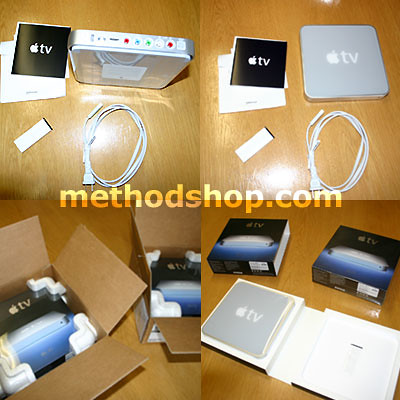
Guess what showed up in the mail today? You can see more Apple TV unpacking photos here.
BeSocial: flickr | methodshop | digg story
BeSocial: flickr | methodshop | digg story
Labels: apple tv
Tuesday, March 20, 2007
Apple TV Shipping
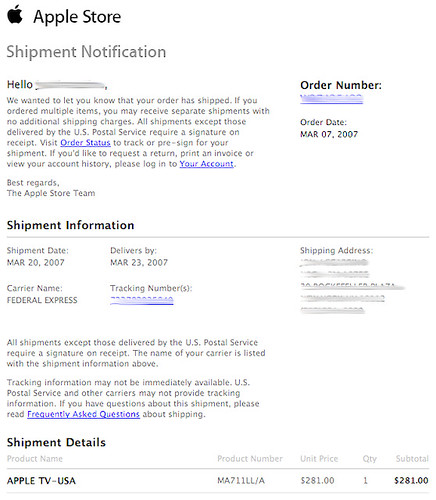
I got an email from Apple this morning at 4 A.M.. Guess my Apple TV is on its way. And it looks like they gave me a discount. I only got charged $281. It's listed for $299 on Apple.com. I pre-ordered my Apple TV the day it was announced. Maybe I got the discount because it got delayed a month?
BeSocial: flickr | digg story | methodshop
BeSocial: flickr | digg story | methodshop
Labels: apple tv
Apple TV Shipping
I got an email from Apple this morning at 4 A.M.. Guess my Apple TV is on its way. And it looks like they gave me a discount. I only got charged $281. It's listed for $299 on Apple.com. I pre-ordered my Apple TV the day it was announced. Maybe I got the discount because it got delayed a month? Let's hope the Apple TV 1.0 software is bug free.
flickr | methodshop
flickr | methodshop
Tuesday, February 27, 2007
Apple TV Delayed
Crap. I was really looking forward to getting my Apple TV ($299) this month. I guess I'll have to wait a little bit longer.

This morning I got the following email from the Apple Online Store regarding my Apple TV pre-order. Apparently "wrapping up" took " a few weeks longer" than they expected... whatever that means.
When I do get my Apple TV (hopefully next month?), it should be an easy unpack and setup. Apple is promising true plug-and-play installation. Just connect Apple TV to your TV (even HDMI is built in) and start iTunes, which will automatically detect it. A few clicks on my remote and I should be in business.
methodshop
This morning I got the following email from the Apple Online Store regarding my Apple TV pre-order. Apparently "wrapping up" took " a few weeks longer" than they expected... whatever that means.
To Our Valued Apple Customer:As you can see, the "letter" from Apple is some of the most uninformative collection of words ever assembled. Apple doesn't even try to explain why shipments of the Apple TV are being delayed. Pete Mortensen from the Cult of Mac blog sarcastically summed up my disappointment pretty well: "Wow. That's a stunningly insightful piece of news. Anyone upset that your new toy isn't showing up Wednesday?"
Thank you for ordering the new Apple TV, an easy to use and fun way to wirelessly play all your favorite iTunes content from your Mac or PC on your widescreen TV.
Wrapping up Apple TV is taking a few weeks longer than we projected, and we now expect to begin shipments in mid-March, not in February as originally anticipated.
You may check the status of your order any time by visiting our online order status website at http://www.apple.com/orderstatus.
A shipment notification, with tracking information, will be emailed to you as soon as your order is shipped. There is no need to contact us unless you choose to change or cancel your order.
We appreciate your business and thank you for shopping at the Apple Store!
Sincerely,
The Apple Store Team
When I do get my Apple TV (hopefully next month?), it should be an easy unpack and setup. Apple is promising true plug-and-play installation. Just connect Apple TV to your TV (even HDMI is built in) and start iTunes, which will automatically detect it. A few clicks on my remote and I should be in business.
methodshop
Tuesday, January 09, 2007
Apple Announces iPhone, Apple TV
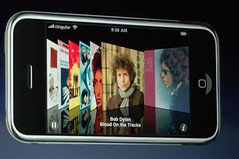 Every once in a while a revolutionary product comes along that changes everything. Apple, a company known for innovation, has been very fortunate in this regard. In 1984 they introduced the world to the first Macintosh and changed personal computing forever. Then in 2001 Apple introduced the first iPod and redefined the music industry.
Today Apple introduced 3 revolutionary products: widescreen iPod, mobile phone, and internet communicator. But there's a catch... these revolutionary products aren't 3 separate devices. They are all rolled into one product called the iPhone ($499 4GB, $599 8GB).
The iPhone (GSM+EDGE) has a touchscreen interface with multitouch capabilities. That means you can use multiple fingers at the same time. How can such a small device have an advanced multitouch interface? The iPhone runs the Macintosh operating system OS X. How did Apple fit an entire operating system into a tiny phone? I don't know. Magic?
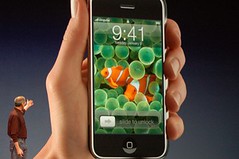 The iPhone syncs to your computer just like your iPod. All your media (music, videos, podcasts, etc.) as well as contacts, email amd calendars will sync to your iPhone. You can even add any any IMAP or POP email account. Yahoo users will like this next perk. Yahoo is giving all iPhone owners free IMAP email. You normally have to pay extra for this feature.
Web browsing on a mobile phone was probably one of the worst user experiences you've ever encountered. Well those days are over. The iPhone uses the Safari browser and can smoothly navigate complicated sites like Google Maps.
And if all this iPhone business wasn't enough, Steve Jobs also announed Apple TV ($299) - a way to enjoy your media on your big screen TV. Anything you put into iTunes (content from iTunes, DVDs you've ripped, videos from YouTube, etc.) can be wirelessly transmitted to your Apple TV box.

The Apple TV has 802.11 WiFi (b, g + n) and will automatically sync from your PC.
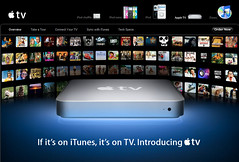 More Apple TV specs:
- 40GB HD
- 720p HD video
- componet
- RCA
- USB 2.0
- ethernet
- WiFi
- HDMI
digg story | methodshop
Apple Announces iPhone, Apple TV
Every once in a while a revolutionary product comes along that changes everything. Apple, a company known for innovation, has been very fortunate in this regard. In 1984 they introduced the world to the first Macintosh and changed personal computing forever. Then in 2001 Apple introduced the first iPod and redefined the music industry.Today Apple introduced 3 revolutionary products: widescreen iPod, mobile phone, and internet communicator. But there's a catch... these revolutionary products aren't 3 separate devices. They are all rolled into one product called the iPhone ($499 4GB, $599 8GB).
The iPhone (GSM+EDGE) has a touchscreen interface with multitouch capabilities. That means you can use multiple fingers at the same time. How can such a small device have an advanced multitouch interface? The iPhone runs the Macintosh operating system OS X. How did Apple fit an entire operating system into a tiny phone? I don't know. Magic?
The iPhone syncs to your computer just like your iPod. All your media (music, videos, podcasts, etc.) as well as contacts, email amd calendars will sync to your iPhone. You can even add any any IMAP or POP email account. Yahoo users will like this next perk. Yahoo is giving all iPhone owners free IMAP email. You normally have to pay extra for this feature.Web browsing on a mobile phone was probably one of the worst user experiences you've ever encountered. Well those days are over. The iPhone uses the Safari browser and can smoothly navigate complicated sites like Google Maps.
And if all this iPhone business wasn't enough, Steve Jobs also announed Apple TV ($299) - a way to enjoy your media on your big screen TV. Anything you put into iTunes (content from iTunes, DVDs you've ripped, videos from YouTube, etc.) can be wirelessly transmitted to your Apple TV box.
The Apple TV has 802.11 WiFi (b, g + n) and will automatically sync from your PC.
More Apple TV specs:- 40GB HD
- 720p HD video
- componet
- RCA
- USB 2.0
- ethernet
- WiFi
- HDMI
digg story | methodshop

Subscribe to Posts [Atom]